
QNAP TS-451+ NAS
vs
Synology DiskStation DS220+ NAS
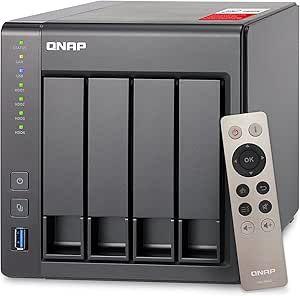
QNAP TS-451+ NAS
QNAP TS-451+ NAS - A quality product with excellent features and performance.
$18.01
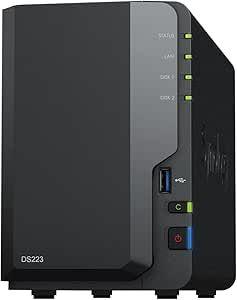
Synology DiskStation DS220+ NAS
Synology DiskStation DS220+ NAS - A quality product with excellent features and performance.
$315.31
Quick Verdict
Winner: Synology DiskStation DS220+ NAS
It offers superior value for money and user-friendly software, making it ideal for home users and small businesses.
Key Differences
- Price: The Synology DS220+ is significantly less expensive than the QNAP TS-451+.
- Number of Bays: QNAP TS-451+ has 4 bays, while Synology DS220+ has 2 bays.
- Processor: The Synology DS220+ has a newer Intel Celeron J4025 processor compared to the QNAP's J1900.
Design & Build
The QNAP TS-451+ is heavier and larger, reflecting its capacity for more storage bays. Both NAS units have a robust build quality, but the Synology DS220+'s compact size and lighter weight make it more suitable for small spaces. Aesthetically, both have a minimalist design, but the Synology's smaller footprint is a clear advantage for users with limited space.
Performance
Both NAS devices offer excellent performance for home and small office use. However, the newer Intel processor in the Synology DS220+ provides a slight edge in efficiency and speed for tasks like file transfers and multimedia streaming. The QNAP TS-451+, while older, compensates with more bays for potential higher storage capacity and RAID configurations.
Features
- QNAP TS-451+ NAS: Offers a wider range of RAID configurations and more USB ports, catering to users needing extensive storage and backup options.
- Synology DiskStation DS220+ NAS: Excels in user-friendly software, including superior backup solutions and remote access features, ideal for less technical users.
Best For
QNAP TS-451+ NAS: Best suited for tech-savvy users or small businesses that require extensive storage and flexible RAID configurations.
Synology DiskStation DS220+ NAS: Ideal for home users and small offices looking for an easy-to-use, efficient, and cost-effective storage solution.
Value Analysis
The Synology DS220+ offers exceptional value, especially for users who prioritize ease of use, software features, and cost-efficiency over maximum storage capacity. The QNAP TS-451+, while more expensive, provides additional bays and flexibility for users with higher storage demands. The choice between them should be guided by specific storage needs and budget constraints.
Final Recommendation
For most home users and small businesses, the Synology DiskStation DS220+ NAS is the recommended choice due to its superior software, ease of use, and better value for money. Users with higher storage needs and a preference for more technical flexibility might find the QNAP TS-451+ more suitable.
| Feature | QNAP TS-451+ NAS | Synology DiskStation DS220+ NAS |
|---|---|---|
| number of bays | 4 | 2 |
| raid support | RAID 0, 1, 5, 6, 10, JBOD, Single | RAID 0, RAID 1, JBOD, Basic |
| maximum capacity per bay | 16 TB | 16 TB |
| processor type | Intel Celeron J1900 Quad-core 2.0 GHz | Intel Celeron J4025 |
| network interface | 2 x Gigabit RJ-45 Ethernet ports | 2 x 1GbE RJ-45 |
| ram size | 2 GB | 2 GB |
| usb ports | 3 x USB 3.0 | 2 x USB 3.0 |
| power supply | External Power Adapter, 90W | 60 |
| dimensions | 169 x 160 x 219 mm | 165 x 108 x 232.2 mm |
| weight | 3.65 kg | 1.3 kg |
| operating system | QTS 4.2 (or later) | DiskStation Manager |
| cooling system | 1 x 120mm fan | 1 x 92mm fan |
| encryption support | AES 256-bit encryption | ✓ |
| backup options | QNAP NetBak Replicator, Apple Time Machine | Cloud Station Backup, Hyper Backup |
| remote access | myQNAPcloud, Qsync | QuickConnect, Synology Drive |
| warranty period | 2 years | 2 years |
| brand | QNAP | Synology |
| model | TS-451+ | DiskStation DS220+ |
More comparisons
See how these products compare with others in the same category
Affiliate Disclosure: Tom's Tech Bench may earn a commission from purchases made through links on this site. This does not affect our editorial independence or the accuracy of our reviews.